

























































Uncategorized
SSD vs HDD vs NVMe: Which Storage Drive Should You Buy in the UAE in 2026?
Jul
SSD vs HDD vs NVMe — confused about which storage drive is the best choice for your laptop or PC in 2026? Whatever brought you here, picking the right storage drive is genuinely one of the bigger calls you’ll make in 2026. HDDs haven’t disappeared — they’re still around — but let’s be real, SSDs and the newer NVMe drives have basically taken over for anyone who wants their computer to feel fast.
Search “SSD vs HDD” and you’ll drown in opinions. Half the internet swears by SSDs for speed. The other half will tell you HDDs give you way more storage for your dirham. And then NVMe SSD shows up promising insane speeds — but is it actually worth the extra cost, or just marketing?
Depends who’s asking, honestly. If you’re shopping in the UAE, what you should buy comes down to your budget, what machine you’re running, how much space you actually need, and what you do on your computer day to day. Chasing the best SSD for laptop use? Planning an internal SSD UAE upgrade? Or just looking into a storage upgrade Dubai for your home setup? Either way, you need to actually understand how HDDs, SATA SSDs, and NVMe SSDs differ — otherwise you’ll overpay for speed you don’t need, or underpay and regret it in six months.
This guide covers all of it — SSD vs HDD, how NVMe SSD tech actually works under the hood, real performance numbers (not just spec-sheet marketing), and how to land on the right drive whether you’re gaming, working, editing, or just browsing.

What is an HDD?
An HDD — Hard Disk Drive — is the old-school tech that’s been sitting inside computers for decades. Spinning magnetic disks, a little mechanical arm physically moving back and forth to grab your data. Sounds ancient because, well, it kind of is.
Moving parts mean two things: slower speeds, and a real risk of damage if you drop it or knock it around. But here’s the thing — HDDs stuck around this long for a reason. You get a ton of storage without spending much.
Advantages of HDD
- Lower cost per GB
- Available in large capacities (2TB, 4TB, 8TB and more)
- Suitable for storing movies, backups, and archives
- Good option for users who prioritize storage over speed
Disadvantages of HDD
- Slower boot and loading times
- Mechanical parts can wear out over time
- Higher power consumption
- Generates more heat and noise
- Less durable compared to SSDs
If you just need somewhere to dump photos, old videos, backups — stuff you’re not opening every five minutes — an HDD still does the job fine.

What is an SSD?
An SSD ditches the spinning disks completely. Flash memory instead, so it grabs your data almost instantly. No moving parts = faster, quieter, and honestly just more reliable day to day.
I’ll say it straight — going from HDD to SSD is probably the single most noticeable upgrade you can make to an old computer. Boot times drop hard. Apps open almost the second you click them. The whole machine just feels different.
Benefits of SSDs
- Faster Windows startup
- Quick application loading
- Silent operation
- Lower power consumption
- Better durability
- Improved multitasking performance
If the best SSD for laptop use is what you’re after, this is usually where you get the most performance per dirham spent.

What is an NVMe SSD?
NVMe SSD (Non-Volatile Memory Express, if you’re curious) is the next step up. Instead of running through the older SATA connection, it plugs straight into your motherboard via PCIe — and that changes everything speed-wise.
This makes NVMe SSDs ideal for demanding tasks such as:
- 4K and 8K video editing
- Professional graphic design
- Software development
- Gaming
- Large file transfers
- Virtual machines
- High-performance workstations
If speed is the whole point for you, don’t even think twice — NVMe is the one.
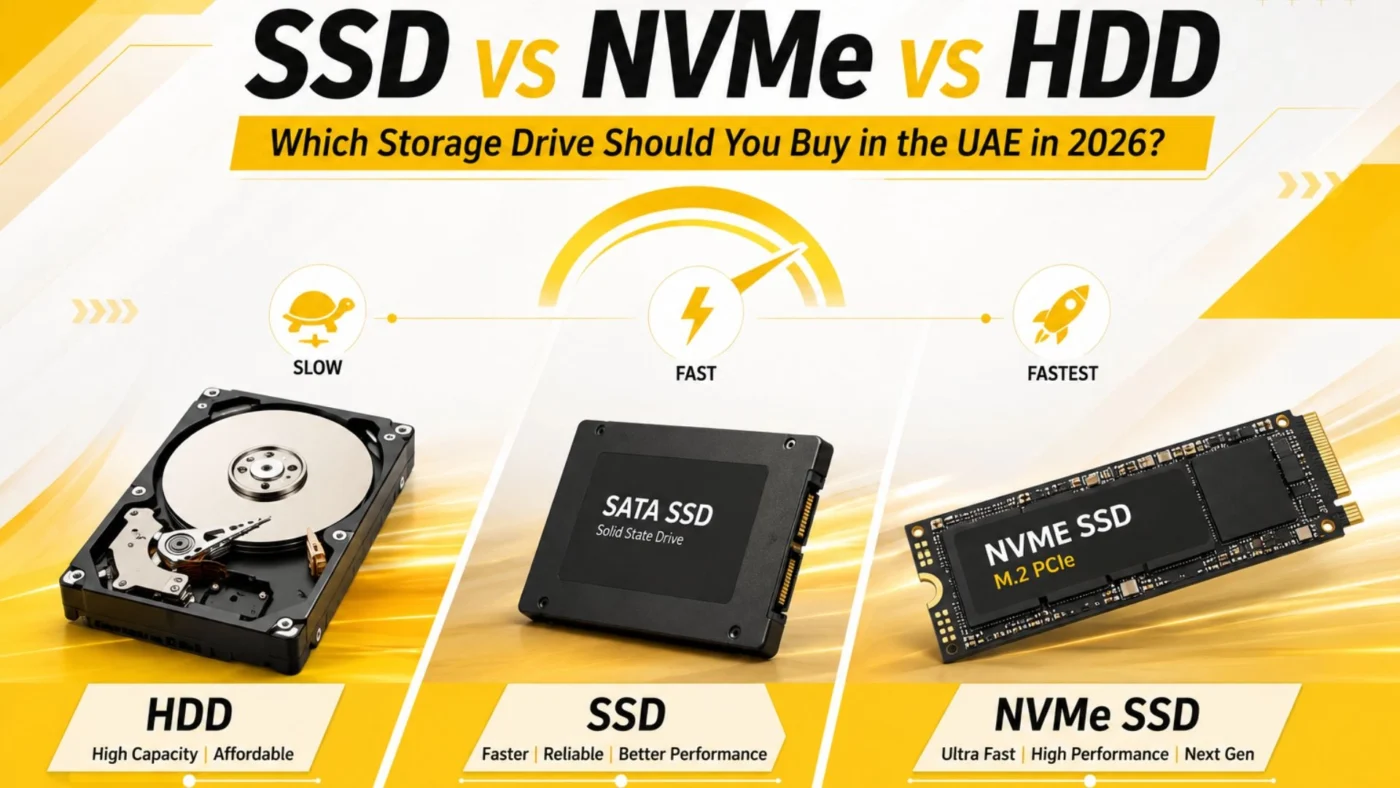
SSD vs HDD vs NVMe
| Feature | HDD | SATA SSD | NVMe SSD |
|---|---|---|---|
| Storage Technology | Mechanical Disk | Flash Memory | Flash Memory (PCIe) |
| Interface | SATA | SATA | PCIe |
| Typical Speed | 80–160 MB/s | 450–550 MB/s | 3,000–7,000+ MB/s |
| Boot Time | 45–90 sec | 15–25 sec | 8–15 sec |
| Game Loading | Slow | Fast | Fastest |
| Noise | Yes | Silent | Silent |
| Power Consumption | High | Low | Very Low |
| Best For | Budget Storage | Everyday Users | Professionals & Gamers |
SSD vs HDD: What's the Difference?
Line them up side by side and it comes down to speed, durability, efficiency, and price. Here’s the breakdown:
|
Feature |
HDD |
SATA SSD |
NVMe SSD |
|
Speed |
Slow |
Fast |
Extremely Fast |
|
Boot Time |
60–90 sec |
15–20 sec |
8–12 sec |
|
Noise |
Yes |
Silent |
Silent |
|
Durability |
Moderate |
High |
Very High |
|
Power Consumption |
High |
Low |
Very Low |
|
Heat Generation |
More |
Less |
Less |
|
Gaming Performance |
Basic |
Excellent |
Outstanding |
|
Price |
Lowest |
Moderate |
Higher |
Basically — SSDs beat HDDs almost everywhere except price per gigabyte. That’s the one category HDD still wins, hands down.
SATA SSD vs NVMe SSD
Both are technically SSDs, but they connect completely differently, and that matters more than people realize.
SATA SSD Same interface old hard drives used, just with flash memory swapped in instead of spinning platters. Solid for daily use, and it’ll fit basically any laptop or desktop out there. Speeds usually sit around 500–550 MB/s.
NVMe SSD Runs through PCIe lanes instead — way more bandwidth to work with. Depending on the generation, you’re looking at 3,000 MB/s all the way up past 7,000 MB/s. If you’re constantly editing video, shuffling huge files, or running heavy software, you will feel this difference. It’s not subtle.
Which Storage Drive is Best for Different Users?
Really depends on what you actually do with your computer. HDD can still handle basic storage duty, sure, but SSDs and NVMe drives just feel like a different generation of technology for anything modern.
For Students
Students typically use laptops for online classes, web browsing, Microsoft Office, PDF editing, and light multimedia tasks.
Recommended Drive: SATA SSD (500GB or 1TB)
SATA SSD (500GB or 1TB) Fast boot, quick file access, doesn’t blow your budget. Covers everything a student actually needs.
For Office Users
Business professionals often multitask between email, Microsoft Office, browsers, accounting software, and video conferencing applications.
Recommended Drive: SATA SSD or NVMe SSD
SATA SSD or NVMe SSD If you’re juggling that many things at once, an SSD cuts down the waiting and just makes the whole day smoother.
For Gamers
Games these days are massive — huge textures, sprawling open worlds. Sure, they’ll technically run off an HDD. But you’ll be staring at loading screens way longer than you’d like.
Recommended Drive: NVMe SSD
Benefits include:
- Faster game loading
- Reduced loading screens
- Better texture streaming
- Faster game updates
- Improved overall gaming experience
Many AAA games in 2026 are optimized for NVMe storage, making it the preferred choice for gaming PCs.
For Video Editors & Content Creators
Editing software is constantly reading and writing massive files. An HDD just can’t keep up — it becomes the bottleneck fast.
Recommended Drive: NVMe SSD (1TB or larger)
Ideal for:
- Adobe Premiere Pro
- DaVinci Resolve
- Photoshop
- After Effects
- Blender
The faster transfer speeds significantly reduce rendering and project loading times.
For Businesses
Documents, databases, VMs, daily operations — this is where reliable storage actually matters most.
Recommended Drive: NVMe SSD
Benefits include:
- Faster file access
- Better employee productivity
- Reduced downtime
- Improved multitasking
- Higher reliability
More reliable long-term If you’re planning a storage upgrade Dubai-wide across an entire office, SSD-based setups are worth the investment.
Real-World Speed Comparison
Here’s how different storage devices perform in everyday tasks.
|
Task |
HDD |
SATA SSD |
NVMe SSD |
|
Windows Boot |
60–90 sec |
15–20 sec |
8–12 sec |
|
Opening Microsoft Office |
Slow |
Fast |
Instant |
|
Large File Copy |
Slow |
Fast |
Extremely Fast |
|
Game Loading |
Slow |
Fast |
Fastest |
|
Windows Updates |
Slow |
Faster |
Fastest |
|
Video Editing |
Poor |
Good |
Excellent |
|
Software Installation |
Slow |
Fast |
Very Fast |
NVMe wins across the board here. SATA SSD sits right in that sweet spot between speed and not spending too much.
Should You Upgrade from HDD to SSD?
Still running an HDD as your main drive? Honestly, upgrading to an SSD is one of the smarter moves you can make.
You’ll notice improvements in:
- Windows startup time
- Software loading
- File transfers
- Multitasking
- System responsiveness
- Battery life (laptops)
People genuinely say their old laptop felt brand new after this swap. Not exaggerating — it’s that noticeable.
Can You Upgrade to an NVMe SSD?
Before you go buy one, check if your laptop or desktop even has an M.2 PCIe slot. Not all of them do.
Worth checking:
- Is there an M.2 slot at all
- What PCIe generation — Gen 3, 4, or 5
- Drive length supported (2280, 2242, etc.)
- BIOS compatibility too
No NVMe support? No big deal — a SATA SSD is still a great upgrade either way.
Best SSD Capacity to Buy in 2026
Choosing the right capacity is just as important as choosing the right type of drive.
|
User Type |
Recommended Capacity |
|
Basic Users |
256GB |
|
Students |
512GB |
|
Office Users |
512GB–1TB |
|
Gamers |
1TB–2TB |
|
Video Editors |
2TB+ |
|
Business Workstations |
1TB–2TB |
For most people, 512GB or 1TB Internal SSD UAE is the sweet spot — enough room without overpaying.
Is an HDD Still Worth Buying?
Yes—but only in specific situations.
An HDD is still a good choice if you need:
- Large backup storage
- CCTV recordings
- Media archives
- Photo libraries
- Budget storage expansion
But for running Windows or actual applications? SSD wins, no contest.

Best SSD Brands Available in the UAE (2026)
If you’re planning to upgrade your laptop or desktop, choosing a trusted brand is just as important as selecting the right storage type. Reliable brands offer better performance, longer warranties, and improved durability.
Here are some of the best SSD brands for laptop and desktop users in the UAE.
Samsung SSD
Still the market leader, honestly. Samsung 870 EVO for SATA, or the 990 Pro if you want NVMe — either way you’re getting solid speed and reliability.
Best for:
- Gaming PCs
- Professional Workstations
- Business Users
- Video Editing
Western Digital (WD)
Covers both ends well. WD Blue for everyday use, WD Black if you’re gaming or creating content and want more punch.
Best for:
- Office Users
- Students
- Gaming
- Everyday Computing
Kingston
Good value, plain and simple. Great pick if you’re upgrading an older machine without wanting to spend a fortune.
Best for:
- Budget Upgrades
- Office PCs
- Student Laptops
Crucial
Made by Micron — plays nice with just about any system, and performance stays consistent. One of the more recommended picks for older laptops needing a boost.
Best for:
- Laptop Upgrades
- Business Computers
- Home Users
Lexar
Been gaining traction fast — fast NVMe drives at prices that don’t hurt.
Best for:
- Gamers
- Students
- Everyday Users
ADATA
Keeps things affordable without cutting corners on performance. Their XPG line is popular with gamers and PC builders.
Best for:
- Gaming
- High-Speed Performance
- Budget NVMe Upgrades
Common Mistakes to Avoid When Buying an SSD
So many people grab a drive without checking if it’ll even fit their setup. Here’s what trips buyers up most.
Buying the Wrong Interface
Not every laptop supports an NVMe SSD. Some older devices only support SATA SSDs.
Always verify your laptop or motherboard specifications before purchasing.
Choosing Capacity Based Only on Price
Buying the cheapest 240GB SSD might save money today, but you’ll likely run out of storage quickly.
For most users in 2026:
- 512GB is the minimum recommended capacity.
- 1TB is the ideal choice for most users.
- 2TB or more is recommended for professionals and gamers.
Ignoring Read and Write Speeds
Two drives, same capacity, totally different performance.
Always compare:
- Sequential Read Speed
- Sequential Write Speed
- Random Read Performance
- Random Write Performance
Forgetting About Warranty
A longer warranty often indicates better product reliability.
Choose SSDs that offer at least a 3 to 5-year warranty for peace of mind.
Buying Without Checking Compatibility
Before ordering an Internal SSD UAE, confirm:
- SATA or NVMe support
- M.2 slot availability
- PCIe generation
- Drive dimensions (2280, 2242, etc.)
This prevents installation issues and unnecessary returns.
Storage Upgrade Tips for UAE Buyers
If you’re planning a storage upgrade Dubai or anywhere in the UAE, follow these tips to get the best value.
✔ Upgrade from HDD to SSD whenever possible.
✔ Choose an NVMe SSD if your motherboard supports PCIe.
✔ Keep at least 20% of your SSD free for optimal performance.
✔ Update SSD firmware regularly.
✔ Clone your existing drive before replacing it.
✔ Back up important files before upgrading.
✔ Purchase genuine products from trusted retailers.
Conclusion
The right drive genuinely changes how your computer feels — not just on paper, but every single day you use it. HDDs still have a place for cheap bulk storage, but SSDs are the standard now for basically every modern setup. And if your system can handle NVMe, that’s as fast as it gets right now for gaming, content creation, or serious professional work.
At the end of the day, SSD beats HDD on boot speed, reliability, and power efficiency — pretty much across the board. Whether you’re hunting for the best SSD for laptop use, planning an internal SSD UAE upgrade, or figuring out a storage upgrade Dubai for your setup, picking the right drive for your actual needs (not just the cheapest one) is what makes it worth it.
Browse our collection of Internal SSDs, NVMe SSDs, Laptop Storage, Computer Components, and Storage Accessories to find what fits your setup. Office PC, gaming rig, or business workstation — better storage is genuinely one of the smartest upgrades you can make in 2026.
Frequently Asked Questions
For most users, an SSD is the better choice because it offers significantly faster boot times, quicker application loading, lower power consumption, and improved reliability. HDDs are still useful for large-capacity storage and backups.
Yes. If your computer supports NVMe, it provides much higher read and write speeds than a SATA SSD, making it ideal for gaming, video editing, software development, and multitasking.
For everyday users, 512GB is an excellent starting point. If you install many applications, games, or work with large files, a 1TB SSD is a better long-term investment.
Yes. Most laptops and desktops allow you to replace a traditional HDD with an SSD. This is one of the easiest and most effective upgrades to improve overall system performance.
Generally, yes. SSDs have no moving parts, making them more resistant to physical damage and mechanical failure than HDDs.
An NVMe SSD is the best option for gaming because it offers faster game loading, smoother performance, and quicker file transfers.