


























































Desktop
Top Business Monitors for 2025: Ultimate Buying Guide for UAE Offices & Startups
Jun
Why Choosing the Right Monitor Matters for Businesses
Choosing the right business monitor directly impacts employee productivity, comfort, and overall work efficiency. High-quality monitors help businesses reduce eye strain, support multitasking, and create a healthier work environment—making them a smart long-term investment for modern UAE offices and startups.
Productivity & Multitasking Benefits
In today’s fast-paced business environment, productivity depends heavily on how efficiently employees can work across multiple applications. A high-resolution business Top Business Monitors for Startups in UAE with a larger screen size allows professionals to view spreadsheets, emails, video calls, and software dashboards simultaneously without constant window switching. UltraWide and dual monitor setups are especially effective for finance teams, developers, and project managers. At Cost To Cost, we recommend business-class monitors that support split-screen workflows and sharp image clarity, helping UAE offices improve efficiency, reduce task completion time, and enhance overall workplace performance.
Comfort & Ergonomics for Long Work Hours
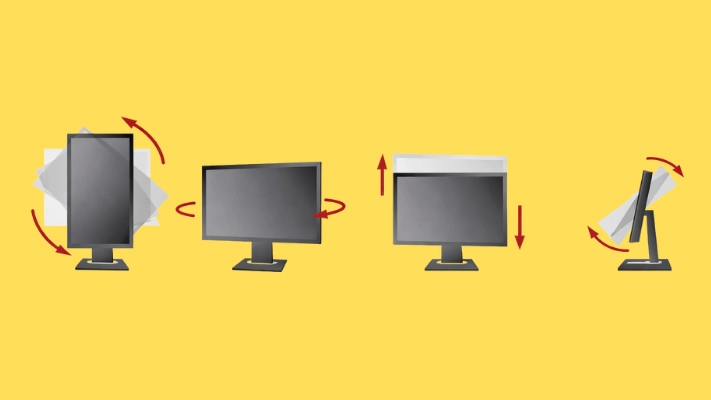
Employees often spend 6–8 hours daily in front of a screen, making ergonomics a critical factor. Poor monitor positioning can lead to neck pain, back strain, and fatigue. Business monitors with height adjustment, tilt, swivel, and pivot features help maintain proper posture throughout the workday. Adjustable stands and VESA-mount compatibility allow offices to customize setups for different users. Cost To Cost supplies ergonomic business monitors designed for long working hours, helping companies create healthier workspaces while improving employee comfort and focus.
Reducing Eye Strain: Important Features for Offices
Extended screen time can cause eye fatigue, headaches, and reduced concentration if the monitor lacks proper eye-care technology. Features such as flicker-free displays, low blue light modes, anti-glare coatings, and high contrast ratios significantly reduce eye strain. These features are especially important in offices with artificial lighting. At Cost To Cost, we offer business monitor setups in Dubai equipped with advanced eye-comfort technologies, ensuring employees stay productive and comfortable throughout the day—without compromising long-term eye health.
Key Features to Consider Before Buying a Business Monitor
Choosing the right business monitor isn’t just about picking the biggest screen. At Cost to Cost, we know that the right features can improve productivity, comfort, and long-term value for your office or startup setup. Here are the key specifications to evaluate before making your purchase.
H3 – Screen Size & Aspect Ratio Explained
Screen size and aspect ratio affect how much you can see and how comfortably you work. Larger screens (27″ and above) are great for spreadsheets, multitasking, and design work, while ultrawide monitors offer even more horizontal space without needing dual displays. The aspect ratio (like 16:9 vs 21:9) determines whether content feels wide or standard — wider screens can replace two monitors and reduce clutter at your desk.
Resolution & Image Clarity (Why 1080p Isn’t Always Enough)
Resolution determines how clear and sharp the display appears. While 1080p (Full HD) is serviceable for basic tasks, higher resolutions like 1440p (QHD) or 4K give you more screen real estate and finer detail — especially important for finance teams, designers, and content creators. Higher resolution boosts clarity when running multiple windows and reduces eye fatigue during prolonged use, a strong advantage highlighted in Cost to Cost reviews.
Connectivity Options (HDMI, DisplayPort, USB-C)
Flexible connectivity ensures your monitor works with laptops, desktops, and docking stations. HDMI and DisplayPort are standard for most office setups, while USB-C adds power delivery and data transfer in one cable — perfect for mobile professionals. At Cost to Cost, we always recommend monitors with multiple ports to future-proof your investment.
Refresh Rate & Response Time: Do They Matter for Work?
For business tasks, a standard 60Hz refresh rate and moderate response time are usually sufficient. Higher refresh rates benefit gaming or fast-moving visuals, but for office productivity, comfort and clarity take priority.
Ergonomics: Height, Tilt, Pivot & VESA Mounting
Ergonomic adjustments — like height, tilt, swivel, and pivot — help customize your workspace and reduce neck strain. VESA mounting support allows flexible setups with monitor arms. Cost to Cost consistently rates monitors with strong ergonomic features higher because they contribute directly to workplace comfort and long-term health.
Best Business Monitors for UAE Offices & Startups
At cost to cost, we’ve hand-picked the best business monitors ideal for UAE offices, startups, and hybrid teams in 2025. From productivity-focused widescreens to budget-friendly options and portable USB-C displays, our recommendations balance performance, ergonomics, and value—helping you choose the right monitor for your workspace without overspending.
1. Best Overall Business Monitor
The best overall business monitor combines exceptional clarity, reliable performance, and flexible connectivity suited for nearly all professional workflows. Look for 27″–32″ screens with QHD or 4K resolution, USB-C docking, and ergonomic stands. These monitors boost productivity with crisp text, vivid colors, and multiple ports for laptops and desktops. Ideal for managers, analysts, and everyday office users, this category delivers a perfect blend of versatility and long-term reliability at cost to cost value standards.
2. Best UltraWide Monitor for Multitasking
UltraWide monitors are perfect for multitasking, giving you the equivalent of two screens without bezels in between. These 34″+ curved displays shine in spreadsheets, design layouts, and coding environments. With wide aspect ratios (21:9 or more), you can view multiple windows side by side, reducing time spent swapping tabs. For UAE users juggling multiple apps daily, an UltraWide boosts workflow and focus while aligning with cost to cost’s commitment to value.
3. Best Budget-Friendly Monitor
Not every business needs premium specs. Budget-friendly monitors deliver solid performance at an affordable price for startups and small offices. Focus on Full HD or QHD panels with reliable color and adjustable stands. These are ideal for general tasks like email, documents, and web conferencing. At cost to cost, we prioritize quality budget options that don’t compromise comfort or durability.
4. Best 4K Monitor for Design & Finance Teams
For designers, analysts, and finance professionals, 4K resolution ensures razor-sharp detail and ample workspace. These monitors enhance clarity for complex datasets, CAD projects, and detailed visuals—perfect for creative studios and financial teams in the UAE. Cost to cost picks emphasize excellent color accuracy and reliable performance.
5. Best Portable USB-C Monitor for Remote Work
Portable USB-C monitors are a game changer for remote and hybrid workers. Lightweight and powered through a single cable, they extend your laptop screen on the go. Ideal for freelancers, consultants, and frequent travelers, these monitors offer convenience without extra adapters—delivering cost to cost practicality and performance on the move.
Monitor Recommendations by Category
Finding the right monitor isn’t one-size-fits-all — different work styles and business needs demand different screen features. Below are top recommendations Cost to Cost suggests for key user groups in UAE offices and startups. These picks balance performance, ergonomics, and value, helping teams work smarter every day.
For Professional Teams & Corporate Offices
For large teams and corporate environments, reliability and productivity are key. Choose monitors with crisp resolution (at least 1080p), adjustable stands for ergonomic comfort, and multiple ports for seamless connectivity. Cost to Cost recommends models with anti-glare panels, pivot functionality, and built-in USB hubs so employees can stay focused without distractions. Large screen sizes (27″ and above) enhance multitasking, making spreadsheets, reports, and dashboards easier to manage.
For Entrepreneurs & Startups on a Budget
Startups and small businesses need performance without breaking the bank. Cost to Cost highlights budget-friendly monitors that deliver solid color accuracy and reliable build quality at attractive prices. Look for 24″–27″ displays with good viewing angles, essential ports like HDMI and Display Port, and basic ergonomic tilt adjustments. These models are ideal for day-to-day tasks, email, video calls, and casual content work — all while keeping costs lean in the early stages of your business.
For Hybrid & Remote Workers
Remote and hybrid employees benefit from flexible setups that support long hours and varied workspaces. Cost to Cost suggests monitors with USB-C connectivity (for single-cable laptop docking), eye-care tech (low blue light and flicker-free), and adjustable height/tilt. Portable options are also great for tight desks or co-working spaces, ensuring comfort and productivity wherever work happens.
For Creative Professionals (Design/Video Editing)
Creative teams demand high fidelity visuals. Cost to Cost recommends 4K or high-resolution monitors with wide color gamut (sRGB/Adobe RGB), superior panel quality (IPS), and accurate calibration. Larger screens or ultra-wide formats help designers and editors see more detail and manage timelines with precision — a must for professional creative work.
Business Monitor Buying Tips (UAE Market Focus)
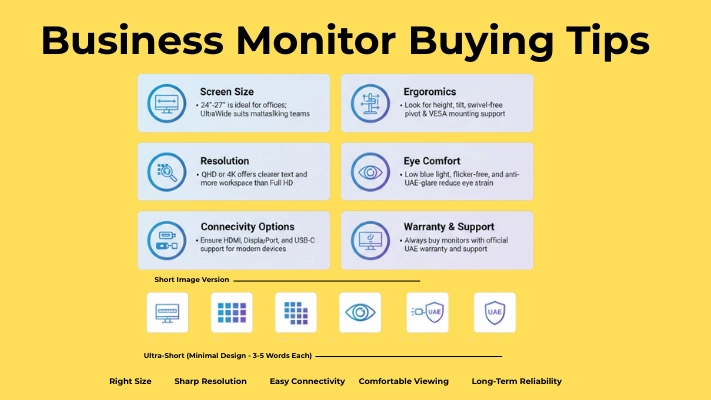
Choosing the right business monitor in the UAE requires more than just comparing screen size or resolution. Businesses must consider local availability, genuine warranty, after-sales support, and pricing trends. Whether you’re setting up a startup office in Dubai, expanding a corporate workspace in Abu Dhabi, or upgrading workstations in Sharjah, buying from a trusted UAE supplier ensures long-term reliability, better support, and value for money. Cost To Cost helps UAE businesses source certified business-class monitors with official warranty and expert guidance.
Best Places to Buy in UAE (Online & Offline)
UAE businesses can purchase monitors through authorized online retailers, brand websites, and local IT solution providers. While large e-commerce platforms offer convenience, they may not always provide business-grade models or local warranty coverage. Buying from an established IT supplier like Cost To Cost ensures access to genuine products, bulk pricing, fast delivery, and expert consultation. Offline IT stores and system integrators are ideal for corporate buyers who need customized solutions, installation support, and long-term partnerships.
Warranty & After-Sales Support in UAE & GCC
Warranty and support are critical for business environments where downtime affects productivity. Always choose monitors with official UAE or GCC warranty, on-site service options, and reliable RMA processes. Cost To Cost works with leading monitor brands and authorized distributors to provide manufacturer-backed warranties, prompt replacements, and dependable after-sales support—giving businesses peace of mind across the UAE.
Price Ranges to Expect in 2025
In 2025, business monitor prices in the UAE vary based on size, resolution, and features. Entry-level office monitors typically start from AED 400–700, while professional QHD and UltraWide monitors range between AED 900–1,800. Premium 4K and USB-C business monitors can cost AED 2,000 and above. Cost To Cost offers competitive pricing, exclusive business deals, and bulk discounts tailored for UAE offices and startups.
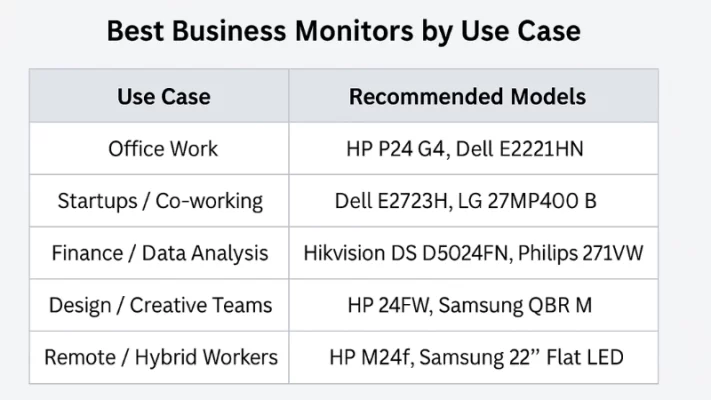
Best Business Monitors by Use Case
General Office Work
- HP P24 G4 (23.8″, IPS, FHD) –24″ IPS panel at 1920×1080, 5 ms response, ideal for document editing and general tasks with crisp clarity
- Dell E2221HN (21.5″, TN, Anti‑Glare) –Reliable and affordable choice, anti-glare screen suitable for regular office environments
Startups & Co‑Working Spaces
- Dell E2723H (27″, IPS, 75 Hz) – Spacious screen with eye-care features, great for multi‑tab workflows; modern design to elevate workspace ambience
- LG 27MP400‑B (27″, IPS, borderless bezel) –Sleek edge‑to‑edge design with solid performance—perfect for shared desk environments
Finance & Data Analysts
- Hikvision DS‑D5024FN (23.8″ FHD borderless LED) – Crisp visuals ideal for spreadsheets; borderless design allows easy multi-monitor setups
- Philips 271V8W (27″, Adaptive‑Sync, FHD) –Large screen and smooth scrolling—great for handling extensive data and graphs
Designers & Creative Teams
- HP 24FW (23.8″, IPS, FHD, FreeSync) – Wide viewing angles and clean color output work well for graphic design and digital art.
- Samsung 13″ QBR‑M (FHD Smart Display) – Though small, it’s high-quality with crisp color fidelity—ideal as a reference or secondary display.
Remote Teams / Hybrid Workers
- HP M24f (23.8″, IPS, FHD, FreeSync) – HDMI + VGA support ensures easy connection to various devices; ideal for rotating between home and office.
- Samsung 22″ Flat LED (FHD) –Compact yet capable, packing both HDMI and VGA ports—versatile and portable-friendly.
Quick Comparison Table
Frequently Asked Questions
24- to 27-inch monitor is ideal for office work. It offers comfortable viewing, enough screen space for multitasking, and fits well on most office desks.
High refresh rates are not essential for business use. A 60Hz to 75Hz monitor is sufficient for office tasks like emails, documents, meetings, and web browsing.
Flat monitors are better for standard office work, while curved screens improve immersion and multitasking on ultrawide displays. Choose based on desk space and work style.
Final Thoughts: Choosing the Best Monitor for Your Business in 2025
Choosing the right business monitor in 2025 depends on screen size, resolution, ergonomics, and connectivity. UAE offices and startups should focus on comfort, productivity, and long-term reliability to maximize daily work efficiency.