


























































Uncategorized
Complete Guide to Access Control Systems: Types, Models, Best Practices &Security Trends
Nov
Access control systems are essential for organizations that need to protect physical spaces, digital systems, and sensitive data. In regions like the UAE and Middle East, where industries such as aviation, healthcare, finance, energy, and government infrastructure operate with high security demands, access control acts as a foundational layer of protection. It ensures that only authorized individuals can enter restricted environments or access confidential information. Modern access control is no longer just about doors and ID cards—it combines digital identity management, biometrics, cloud platforms, and automated monitoring. This guide explains access control in clear, simple language and covers how it works, why it matters, different control models, authentication methods, best practices, and future trends. The goal is to provide an informative reference for professionals and students without promoting any particular vendor or system.
What is Access Control?
Access control is a structured method used to manage, verify, and regulate who can access specific locations, systems, or data. It establishes rules that determine entry based on identity, organizational role, time, device type, or security clearance. In physical environments, access control systems manage entry into buildings, secured floors, server rooms, gates, and sensitive areas by validating a credential such as a card, biometric scan, or mobile token. In digital environments, access control determines which users can log in to platforms, open confidential files, or perform administrative functions.
How Access Control Works
A complete access control process typically follows four stages: identification (recognizing the user), authentication (verifying identity), authorization (granting appropriate access), and auditing (recording activity). These steps ensure that users are not just verified once but continuously monitored through logs and permissions. The system checks requests against predefined rules stored in a database, and if conditions are met, access is granted. Otherwise, the request is denied, and the event may be recorded for security review.
Why Access Control is Important
The purpose of access control extends beyond restricting entry—it protects assets, enforces accountability, supports safety protocols, and prevents unauthorized interactions with sensitive environments. In the UAE and Middle East, where financial hubs, smart city infrastructures, and government operations rely on secure environments, access control minimizes risks such as theft, espionage, sabotage, data leaks, and physical intrusion. It also helps organizations maintain control during emergencies, inspections, or compliance checks.
Security and Operational Protection
A strong access control system limits exposure to internal and external threats by restricting who can reach high-value assets. For example, even employees within a company may have different access levels based on their role or project involvement. This reduces the impact of stolen credentials, social engineering attempts, and unauthorized tailgating. It also ensures that facility managers can isolate sensitive areas, such as data centers or control rooms, without disrupting regular operations.
Legal, Safety & Compliance Requirements
Many industries operate under regulations requiring controlled access and proper logging. For example, healthcare systems must protect patient records, financial institutions must safeguard customer data, and critical infrastructure must follow strict security frameworks. Access control systems help organizations maintain documented records for audits and investigations while ensuring privacy laws and security standards are followed.
The Benefits of an Access Control System
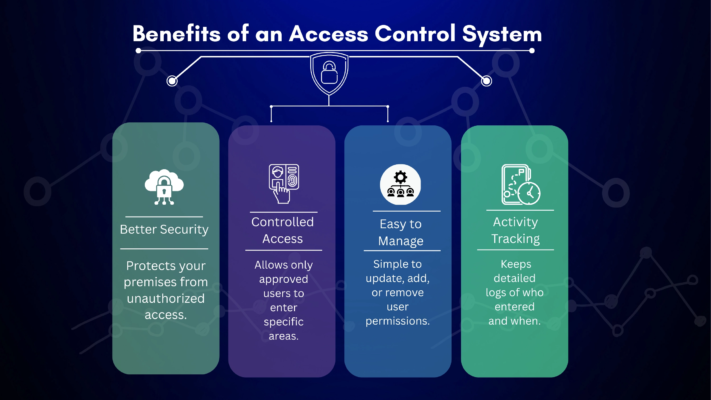
Access control systems provide organizations with greater visibility, control, and flexibility compared to traditional lock-and-key methods. Digital credentials can be assigned, revoked, or modified instantly without physical replacement. Access data can be analyzed to understand behavior patterns, improve planning, or investigate incidents. These systems also centralize permissions, making it easier to manage large teams, temporary workers, contractors, and visitors.
Improved Security and Risk Reduction
Unlike physical keys, which can be duplicated or misplaced, digital or biometric credentials are unique to each user. If a device or card is lost, administrators can remotely deactivate access without changing hardware. Systems can also alert security teams when suspicious access attempts occur, helping prevent breaches before they escalate.
Better Efficiency and Automation
Access rights can be tied to HR workflows, enabling automatic changes when employees join, change roles, or leave the organization. This eliminates manual tracking and reduces human error. Organizations can also rely on audit logs to support forensic investigations, compliance reviews, and emergency responses.
Types: Physical & Logical Access Control
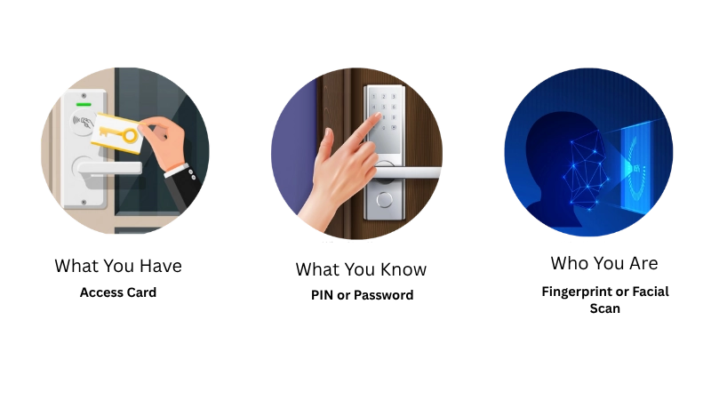
There are two primary categories of access control: physical and logical. Physical access control manages entry to real-world spaces, while logical access control shields digital systems, data, and networks from unauthorized access. In today’s security landscape, both are equally important because many threats originate from a combination of digital and physical weaknesses. For example, unauthorized access to a server room can lead to cyberattacks, while stolen login credentials can allow someone to manipulate physical systems. Due to these overlaps, organizations in the UAE and Middle East increasingly use integrated platforms that apply unified identity policies across both physical and digital environments, helping maintain consistent monitoring and improving overall security posture.
Physical Access Control
Physical access control regulates who can enter secure buildings, floors, parking areas, or restricted rooms. These systems use devices such as smart locks, access cards, PIN pads, biometric scanners, turnstiles, and visitor management systems. In critical environments like airports, banks, healthcare facilities, and industrial zones, physical access control may also link to alarms, surveillance systems, and emergency response tools. This not only prevents unauthorized entry but also helps track movement patterns, monitor attendance, and maintain safety protocols during emergencies.
Logical Access Control
Logical access control protects software systems, cloud platforms, confidential files, and digital accounts. It relies on authentication methods such as passwords, tokens, certificates, biometrics, and multi-factor authentication. Logical control is vital for preventing unauthorized logins, account misuse, data leaks, and fraudulent transactions. It also enforces identity-based restrictions for remote workers, system administrators, and external partners.
Unified Access Ecosystems
Modern organizations increasingly combine physical and logical access into unified identity systems. Instead of managing separate credentials, users have a single verified identity across all systems—from entering buildings to logging into enterprise software. This reduces complexity, strengthens auditing, and ensures access changes instantly when roles or employment status change. Unified access also supports zero-trust security models and enhances monitoring by connecting physical behavior with digital activity logs.
Access Control Models: DAC, MAC, RBAC, ABAC
Access control models define how permissions are granted and enforced. Each model offers different levels of flexibility, management effort, and security strength.
|
Model |
Concept | Best For |
|
DAC |
Owner decides access | Small teams, basic environments |
|
MAC |
Central authority controls permissions |
Military, classified systems |
| RBAC | Role-based permissions |
Large organizations, corporate apps |
| ABAC | Attribute-based, dynamic |
Cloud platforms, adaptive security |
Discretionary Access Control (DAC)
Discretionary Access Control (DAC) places permission control in the hands of the data or resource owner rather than a centralized authority. This means the person who creates or manages a file, system, or physical resource can decide who is allowed to access it. DAC is flexible and easy to implement, which makes it suitable for small organizations, educational environments, or cases where collaboration is needed without strict regulatory requirements. However, because users control their own permissions, there is a higher risk of inconsistent access rules, accidental permission sharing, and unauthorized data exposure. DAC requires careful oversight to remain secure.
Mandatory Access Control (MAC)
Mandatory Access Control (MAC) is a highly controlled and restrictive model where access rules are defined by system administrators or government-level authorities, not end users. Resources and users are classified into security levels, and permissions follow a strict hierarchy—for example, “Top Secret”, “Confidential”, or “Restricted”. Since resource owners cannot modify access independently, MAC reduces the risk of accidental leaks or unauthorized sharing. This model is commonly used in defense, military, national security, laboratories, and environments that handle sensitive or classified data. While MAC offers strong protection, it is less flexible and requires advanced administrative planning to manage changes.
Role-Based Access Control (RBAC)
Role-Based Access Control (RBAC) assigns access permissions based on predefined roles rather than individual user decisions. Each role—such as “Manager”, “Technician”, or “HR Staff”—contains a set of access privileges aligned with job responsibilities. When a user’s role changes, their access updates automatically, reducing manual intervention. RBAC is widely used in corporate environments, cloud platforms, ERP systems, and organizations with structured departments. It improves security consistency, simplifies audits, and reduces the chance of human error—but requires proper role planning. Poorly designed role structures can lead to overlapping permissions and excessive access if not periodically reviewed.
Attribute-Based Access Control (ABAC)
Attribute-Based Access Control (ABAC) uses multiple contextual factors—called attributes—to determine access. These attributes may include user identity, device type, location, time of request, security clearance, role, and even environmental conditions such as risk level. Instead of relying on preassigned roles alone, ABAC evaluates real-time conditions, making it adaptive and suitable for cloud environments, remote workforces, and modern cybersecurity frameworks like Zero Trust. ABAC provides highly granular control and can enforce different rules for the same user under different circumstances. However, it requires complex configuration and continuous policy management to function effectively.
Authentication Methods: Card, PIN, Biometrics, Mobile
Authentication validates identity before granting access. Different methods provide varying levels of security and convenience.
|
Method |
Strengths | Limitations |
| RFID / Smart Cards | Quick, scalable |
Can be lost or shared |
| PIN / Passwords | Simple and cost-effective |
Vulnerable to theft or guessing |
| Biometrics | Unique to each user |
Requires hardware, privacy concerns |
|
Mobile Credentials |
Remote activation and revocation |
Dependent on device security |
Multi-Factor Authentication (MFA)
MFA combines two or more authentication factors—for example, fingerprint + PIN, or mobile credential + facial recognition. This significantly reduces unauthorized access by ensuring that even if one credential is compromised, access cannot be granted without the second layer. MFA is widely used in financial institutions, government systems, and high-security corporate environments where identity verification requires tighter controls. It also supports remote access security for hybrid workplaces and cloud systems.
Biometric Identification Growth
In the UAE and Middle East, biometrics are widely adopted in airports, healthcare systems, and government ID programs due to high accuracy and traceability. Airports use facial and iris recognition for faster border control, while hospitals deploy fingerprint access for restricted medical areas and sensitive patient records. National identity initiatives in the region have accelerated biometric acceptance, making it a preferred method for high-security authentication across commercial and public sectors.
Network Access Control Basics
Network Access Control (NAC) protects digital systems by regulating which users and devices can connect to internal networks, cloud environments, and VPNs. NAC ensures access decisions are based not only on user identity but also on device security posture, such as whether antivirus is installed or software is updated.
Device Verification Requirements (Expanded)
Devices connecting to a network may need to meet security conditions such as encryption, trusted operating systems, approved applications, and compliance with corporate cybersecurity policies. Some NAC systems also evaluate device health in real time, checking factors like patch updates, login behavior, and connected peripherals before granting full access. If a device fails checks, it may be quarantined in a restricted network zone, monitored, or prompted for remediation actions.
Zero-Trust Architecture (Expanded)
Modern NAC systems follow zero-trust principles, meaning users and devices are continuously authenticated rather than relying on a single login event. Each access request is evaluated based on identity, device posture, location, and risk context. Instead of assuming internal users are safe, the system treats every connection as untrusted until verified. This reduces breach impact, prevents lateral movement within networks, and limits unauthorized access even if credentials are compromised.
Key Best Practices for Access Control
A strong Access control systems UAE price requires a balance of technology, policies, and continuous oversight. Effective governance ensures access rights remain accurate throughout the lifecycle of employees, contractors, and visitors. It also reduces the chances of internal misuse, unauthorized entry, and security gaps created by outdated permissions. By combining structured identity policies, monitoring tools, and regular audits, organizations can maintain long-term, consistent security without disrupting operations.
Least Privilege & Role Segmentation
Users should receive only the access required to perform their tasks, rather than broad permissions. This reduces exposure from insider threats or stolen credentials by limiting how far an attacker could move internally. Sensitive operations should be separated into different permissions so no single user has full control. This approach supports compliance, prevents privilege abuse, and protects high-risk systems.
Regular Review & Monitoring
Organizations should periodically remove inactive accounts, adjust permissions when roles change, and analyze activity logs for unusual behavior. Automated alerts and monitoring tools help detect patterns like repeated failed attempts, off-hours access, or attempts to enter restricted zones. Routine audits ensure the system stays aligned with changing workforce structure, security policies, and regulatory requirements.
Credential Security & Training
Users should understand how to handle credentials securely—avoiding shared logins, reporting lost cards immediately, and preventing tailgating at entry points. Strong passwords, MFA, and secure credential issuance procedures further reinforce protection. Training should also include device security, social engineering awareness, and proper biometric usage to reduce accidental leaks and unauthorized access.
Latest Security Trends (Cloud, Mobile, AI)
Access control is evolving alongside digital transformation in the Middle East. Organizations are shifting from standalone systems to integrated identity platforms that combine analytics, automation, and remote management. These advancements support large-scale smart city projects, remote work environments, and digital-first infrastructure across sectors like government, aviation, healthcare, and retail. As systems become more interconnected, modern access control focuses not just on preventing unauthorized entry but also improving user experience, reducing operational costs, and enabling real-time decision-making through data insights.
Cloud-Based Access Control Systems
Cloud platforms allow remote configuration, centralized dashboards, real-time monitoring, and improved scalability across multiple branches or cities. This is especially useful for expanding industries in Dubai, Abu Dhabi, Riyadh, and Doha, where organizations operate multiple facilities. Cloud systems also reduce dependency on on-site servers, enable faster updates, improve disaster recovery, and support integration with IoT devices, making them suitable for fast-growing smart infrastructure and multi-location enterprises.
Mobile-First and Touchless Access
Mobile access credentials use NFC or Bluetooth as digital keys. They reduce reliance on physical cards, enhance convenience for users, and support multi-layer authentication using built-in biometrics. Touchless access is also preferred in environments where hygiene and streamlined movement are priorities, such as hospitals, hotels, coworking spaces, and airports. Mobile systems are easier to issue and revoke remotely, making them ideal for temporary staff, visitors, and contractors without physical onboarding.
AI, Analytics & Automated Risk Detection
AI can analyze access events to identify suspicious behaviors such as unusual time-based access, repeated failed attempts, or entry from unfamiliar devices. Predictive analytics help organizations act before a security issue occurs. AI-driven systems can also automate alerts, enforce policy-based access decisions, and correlate data from CCTV, sensors, and network logs. This reduces manual monitoring and builds a proactive security environment that adapts to user behavior over time.
How to Choose the Right Access Control System
The best system depends on organizational size, security level, industry needs, compliance requirements, and growth strategy. A careful evaluation helps avoid compatibility issues and unnecessary costs. Businesses should also consider long-term expansion plans, user capacity, maintenance requirements, and the ability to integrate new authentication technologies as standards evolve. Choosing the right system ensures scalability while maintaining security across physical and digital environments.
Key Selection Factors
Organizations should assess integration support, hardware durability, scalability, cost structure, and ease of management. Systems should work seamlessly with surveillance, HR platforms, directory services, and network security tools. Decision-makers should also evaluate local support availability, compliance with regional regulations, encryption standards, backup options, and analytics capabilities to future-proof security infrastructure.
Implementation Strategy
A phased rollout minimizes disruption by onboarding users gradually, testing performance, and aligning policies with operational workflows. Training end-users and administrators is essential to ensure proper usage. Organizations should also conduct pilot deployments, document access rules, create emergency access protocols, and monitor system performance after installation to refine roles and permissions. Continuous evaluation ensures the system remains secure as workforce and infrastructure evolve.
Conclusion
Access control systems play a vital role in securing both physical and digital environments by regulating identities, permissions, and user activity. As the UAE and Middle East continue to expand technologically and economically, organizations must adopt modern access control solutions that support biometrics, mobile credentials, cloud platforms, and strong authentication models. Implementing the right system not only enhances security but also improves operational efficiency, compliance, and data protection. Now is the ideal time for businesses, institutions, and government entities to assess existing security frameworks and upgrade to more advanced and scalable solutions that align with long-term growth and regulatory needs. To explore the best access control options for your facility or to get expert assistance, reach out to us for support, consultation, or tailored system guidance.
Address: Office 81, Ground Floor, Gateway Building, Khaled Bin Al Waleed Street, Bur Dubai, Dubai, UAE — centrally located for quick on-site support across Dubai and nearby regions.
E-mail: [email protected] — contact us for inquiries, project requirements, quotations, or technical consultations.
Mobile: +971 56 551 3315 — speak directly with our team for urgent support, product details, or installation assistance.